
Mobile Cartoon Generator: Transform Phone Photos Like a Pro
Your smartphone is always with you, capturing life's spontaneous moments. From a funny face your pet makes to a beautiful sunset on vacation, your phone's camera is ready. But what if you could instantly turn those everyday photos into stunning cartoons, anytime and anywhere?
Many people think creating high-quality art requires a desktop computer and complex software. That smartphone in your pocket? It's not just for calls and texts—it's your personal creative studio. With the right approach, you can transform your phone pictures into amazing cartoon characters and avatars on the go. Ready to level up your mobile photo game? Here are our insider tips for getting amazing cartoon results every time.
In this article, we'll cover everything from preparing your phone to choosing the best styles for a smaller screen. You'll learn how to master the art of mobile photo-to-cartoon conversion with CartoonGenerator.ai, our powerful and easy-to-use online tool.

Getting Started: Mobile Photo to Cartoon Basics
Before you start transforming your photos, it’s helpful to understand why mobile cartoon generation is so popular and how a little preparation can make a big difference. This sets you up for success and ensures your final images look incredible.
Why Choose Mobile Cartoon Generation?
The biggest advantage of mobile cartoon generation is convenience. There's no need to transfer photos to a computer or wait until you get home. Inspiration can strike at any moment, and with CartoonGenerator.ai, you can act on it immediately. See a perfect photo opportunity at a family gathering? You can capture it and turn it into a fun cartoon portrait within minutes to share with everyone.
This instant creativity makes it perfect for social media enthusiasts, travelers, and anyone who loves to share their life in a unique way. Instead of posting another standard selfie, you can upload a personalized Disney-style avatar or a Ghibli-style landscape. It’s a fantastic way to make your content stand out without needing any design skills.
Preparing Your Phone for Optimal Results
To get the best results from any photo-to-cartoon AI, the quality of your original image matters. Before you upload, take a moment to prepare your phone and your photo. First, ensure your phone's camera lens is clean. A quick wipe with a soft cloth can remove smudges and dust that make photos look blurry.
Next, choose a photo with good lighting and a clear subject. AI algorithms work best when they can easily identify the main features of a face or object. Avoid photos that are too dark, blurry, or have very busy backgrounds. If you have a favorite picture, you can use your phone's basic editing tools to slightly increase the brightness or contrast before uploading it to the cartoon generator.
Upload Techniques for Perfect Mobile Cartoons
The upload process is where your creative journey truly begins. How you select and upload your photo from your phone can impact the final cartoon. Understanding the best practices for mobile uploads will help you avoid common issues and ensure your image is processed perfectly.
Avoiding Cropped Photos on Mobile
One common frustration when using web tools on a phone is accidental cropping. Sometimes, the mobile browser interface can make it tricky to frame your photo correctly. To avoid this, select your photo from your gallery first. Pay attention to the preview window in the uploader to make sure the most important parts of your image—like a person's face or a pet's key features—are fully visible.
CartoonGenerator.ai is designed to be mobile-friendly, but it's always a good habit to double-check the preview. If your subject is too close to the edge of the original photo, consider using your phone's editor to add a little extra space around it. This gives the AI more room to work its magic without cutting off essential details.
Camera Roll vs. Live Camera: When to Use Each
Most mobile users will upload photos directly from their camera roll or photo gallery. This is the best option for almost every situation because it allows you to choose your very best pictures. You have time to review, edit, and select the image that will produce the most stunning cartoon. Whether it's a carefully posed portrait or a lucky candid shot, your camera roll is your treasure trove of creative potential.
While some platforms offer a 'live camera' option, it's generally better to use pre-existing photos. A live shot might be rushed, poorly lit, or out of focus. By taking the photo first and then using our photo to cartoon tool, you guarantee the highest quality source material for your cartoon creation.
Mobile Style Selection for Maximum Impact
Once your photo is uploaded, the fun part begins: choosing a style! The interface on a mobile device is different from a desktop, so knowing how to navigate the options efficiently and which styles look best on a smaller screen will enhance your experience.
Touch-Friendly Style Navigation
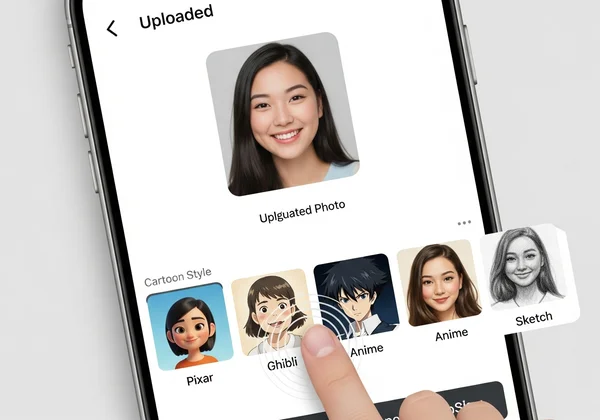
A well-designed mobile cartoon generator should offer a smooth, touch-friendly interface. On CartoonGenerator.ai, the styles are presented in a clear, scrollable list with visual previews. You can easily tap through different options like Pixar, Ghibli, Anime, and Sketch to see which one fits your photo best.
The visual previews are key. They give you an instant idea of how each artistic style will transform your image. Instead of just reading a name, you see an example. This makes the selection process intuitive and fast, allowing you to experiment with multiple styles in just a few seconds until you find the perfect match for your vision.
Best Cartoon Styles for Phone Screens
While all styles can look great, some are particularly effective on smaller phone screens. Styles with bold lines and clear features, such as Disney, Pixar, and Anime, tend to stand out well. These styles create high-contrast images that are easily recognizable and shareable on social media platforms like Instagram or as profile pictures on Discord and WhatsApp.
For photos of landscapes or pets, the Ghibli style offers a beautiful, painterly effect that looks stunning even on a small display. If you're looking for something more artistic or abstract, the Sketch and Pixel Art styles provide a unique retro or hand-drawn feel. Feel free to try a few styles to see which one makes your photo pop.
Optimizing Your Mobile Cartoon Creation Process
Creating on the go means being mindful of things like mobile data and knowing when your phone is the best tool for the job. These final tips will help you streamline your process and make mobile cartoon generation a seamless part of your creative workflow.
Saving Data While Creating High-Quality Cartoons
Creating AI art involves processing data, but you don't need to use up your entire mobile data plan. The best way to manage data usage is to connect to a WiFi network whenever possible, especially if you plan on creating multiple images. This ensures a stable, fast connection without worrying about data caps.
However, CartoonGenerator.ai is optimized to work efficiently even on a mobile data connection. The image processing happens on our powerful servers, not on your device. This means the tool doesn't drain your phone's battery or use an excessive amount of data for a single creation. You can confidently create a new cartoon avatar while waiting for a coffee without any issue.
Desktop vs. Mobile: When Each Shines
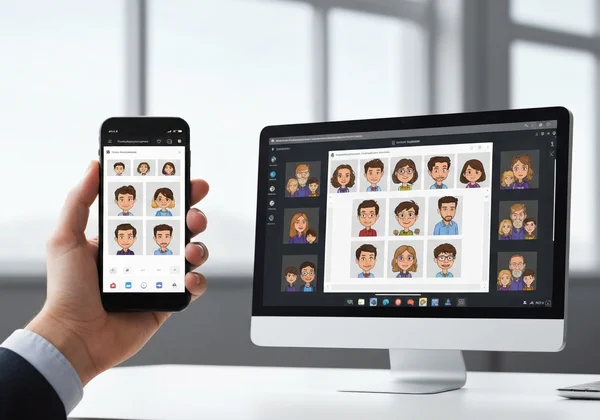
Your smartphone is perfect for quick, spontaneous creation and social media sharing. It excels when you want to turn a new selfie or fun moment into a cartoon right away. The mobile experience is designed for speed and convenience, making it ideal for 'in-the-moment' creativity.
A desktop computer offers a larger screen, which can be beneficial for detailed work or comparing multiple generated images side-by-side. If you are a content creator or designer using the generated cartoons for a larger project, like a YouTube thumbnail or blog post, you might prefer the desktop interface. Both platforms use the same powerful AI, so you can get amazing results no matter which device you choose.
The Takeaway
The bottom line? Your mobile device puts creative power right at your fingertips. By following these pro tips, you can master the art of mobile cartoon generation and turn your everyday photos into captivating works of art, no matter where you are. From preparing your photo to choosing the perfect style, you now have the knowledge to create stunning cartoons with ease.
The convenience of creating on the go means you never have to let a moment of inspiration pass you by. You have everything you need to design unique social media avatars, create fun portraits of friends and family, and explore your artistic side.
Ready to transform your mobile photos into cartoon art? Visit CartoonGenerator.ai today and unleash your creativity on the go!
Additional Resources
Frequently Asked Questions
Does CartoonGenerator.ai work on both iOS and Android devices?
Yes, absolutely! CartoonGenerator.ai is a web-based tool, which means it works directly in your mobile browser. There is no app to download or install. As long as your iOS or Android device has a modern web browser like Chrome, Safari, or Firefox, you can access our tool and start creating.
Why does my cartoon look different on mobile compared to desktop?
The final generated cartoon is created by the same AI engine, so the artistic output is identical. However, the way it appears might seem slightly different due to screen size, resolution, and color calibration of your device. A high-resolution desktop monitor may display more subtle details than a smaller phone screen.
Can I use mobile data to create cartoons, or do I need WiFi?
You can use either. Our tool is optimized to work well over both WiFi and standard mobile data connections (like 4G or 5G). For the fastest and most stable experience, especially if you're generating many images, WiFi is recommended. However, creating a few cartoons over mobile data uses a minimal amount of data.
Are there mobile-specific cartoon styles not available on desktop?
No, all our cartoon styles are available on both mobile and desktop platforms. We believe in providing a consistent and complete experience, no matter how you choose to access our tool. You can enjoy the full range of styles like Ghibli, Pixar, Anime, and more, right from your phone. You can explore all styles on our homepage.